
500+
LMS and BI platforms supported
Lower risk at enterprise scale
You get a mature platform, an experienced enterprise team, and the stability to support your program for years to come.
Requires Insights-integrated content
See how Insights works

PICO MDM alternative
The enterprise layer around your PICO fleet

Fall Safety · Module 3




PICO builds headsets teams keep for years. ArborXR is the layer around them: proof for the business, governance for IT, one console as the fleet grows.
500+
LMS and BI platforms supported
You get a mature platform, an experienced enterprise team, and the stability to support your program for years to come.
Requires Insights-integrated content
See how Insights works
50+
Fortune 500 security reviews passed
Intune device compliance, SSO, and group-scoped admin roles, so headsets are governed like every other managed device on your network.
SOC 2 Type II · ISO 27001 · GDPR
5,500+
organizations on the platform today
ArborXR manages PICO next to Quest, HTC, Galaxy XR, and Magic Leap, in the same groups with the same admin roles.
80+ Fortune/global 500 · 90+ countries
Rated #1 on G2 for XR device management.

"As we scale XR training across the enterprise, ArborXR stands out as the best enterprise MDM solution on the market."

Mohsen Khurasany,
Senior Manager, XR Innovation & Content

| Capability | ArborXR | PICO Business Device Manager |
|---|---|---|
| Remote deployment, device groups, kiosk mode | ✓ | ✓ |
| Single sign-on and role-based access | ✓ | ✓ |
| Enterprise Wi-Fi setup and configuration packages | ✓ | ✓ |
| LBE map and boundary management | Not included | ✓ |
| Manage PICO alongside Quest, HTC, Galaxy XR and Magic Leap | ✓ | PICO devices only |
| Release channels for staged rollouts across groups | ✓ | Not included |
| Track results for each learner Requires Insights | ✓ | Not included |
| Send data to your existing LMS or BI platforms Requires Insights | ✓ | Not included |
| Sign learners in from inside the headset Requires Insights | ✓ | Not included |
| Enforce Conditional Access through Microsoft Intune | ✓ | Not included |
| Support users live with two-way audio and camera view | ✓ | Not included |
| Retrieve files and logs without touching the device | ✓ | Not included |
| Share apps with usage analytics for ISVs | ✓ | Not included |
| Manage AI glasses and headsets together | ✓ | Not included |
| Ask fleet and learner questions in Claude, ChatGPT, or Copilot using an MCP | ✓ | Not included |
| Ready to see it on your fleet? | Book a demo |
Learner results come from content built with ArborXR Insights. • See all ArborXR features and pricing.
We manage the whole move with you and your fleet keeps training the whole way through. Switching is simpler than you think.
Plan your migrationKeeping headsets updated is table stakes. What sets a program apart is the experience on the device itself, from the moment a learner puts it on to the moment they need a hand.
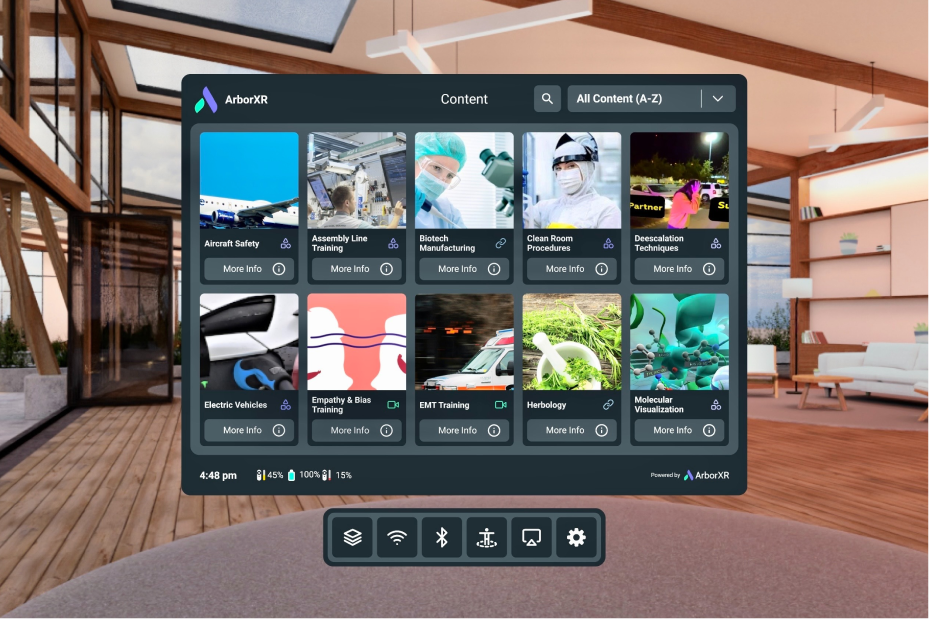
ArborXR Home puts your brand on every headset: your colors, your 3D environment, and only the apps and WebXR links you choose.
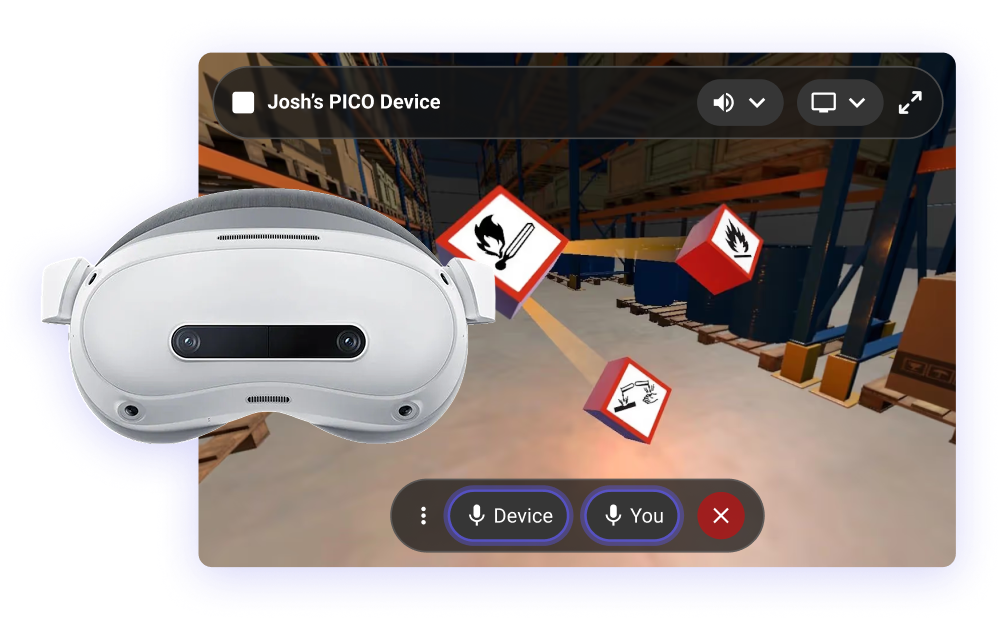
Cast what the user sees, hear what they hear, and talk to them inside the headset, so support never has to walk to the device.
ArborXR has done one thing since 2016: device management for XR. 3,000+ organizations and 50+ of the Fortune 500 treat it as critical infrastructure, so stability, reliability, and security are our entire job.
Jul 2026
Headsets report status for Entra Conditional Access
Jul 2026
Browse and pull files from any device in the fleet
Jul 2026
ArborXR Home and kiosk mode on day one
Jun 2026
Including Remote Assistance with two-way audio
Jun 2026
Insights data added the following month
Feb 2026
Install store apps to managed fleets
Nov 2025
SCEP with dynamic challenge
Nov 2025
Inspect device storage without touching the headset
All shipped in the past 12 months. See what's coming next.
ArborXR manages PICO's enterprise headsets, from the Neo 3 range through PICO 4 Ultra Enterprise, and support tracks new models as PICO releases them. See the full list, or bring your model numbers to a demo.
You factory reset each headset and enroll it into ArborXR. The hardware is unaffected and stays yours. We plan the rollout in batches, so your fleet keeps working while it happens.
Not directly: XR headsets cannot enroll in Intune the way laptops do. ArborXR is an official Microsoft Intune Device Compliance partner, so headsets managed by ArborXR report their status into Intune, compliance is evaluated there, and Conditional Access applies to XR the same way it applies to every other device.
Yes. Kiosk mode boots the headset straight into one app, so a trainee puts it on and lands in the training.
Yes. ArborXR manages PICO alongside Quest, HTC VIVE Focus, Galaxy XR, Magic Leap, and other Android-based devices, in the same groups with the same admin roles, so a mixed fleet does not mean a second console.
In bulk. The Device Setup App enrolls devices in batches, and a configuration package applies the group, apps, Wi-Fi, and settings on the way in, so a headset comes out of the box ready to hand to a trainee.
Per device. The case for it is the rows in the comparison above: learner results, IT integrations, and one console across vendors. Talk to our team for a quote matched to your fleet.
Content you have already deployed plays without a connection, so a headset can be used offline all day. Remote commands, deployments and status reporting need the device to reach the internet at some point. If your program runs permanently on a closed network, ArborXR is not the right fit and we will tell you so.
ArborXR is SOC 2 Type II and ISO 27001 certified, GDPR compliant. For healthcare and education, we give teams the controls to run XR programs in HIPAA- and FERPA-regulated environments. Single sign-on (Okta, Microsoft Entra) and role-based access control come standard, and every control is published in our Trust Center for your security review.
The main alternatives to PICO Business Device Manager are ArborXR, ManageXR, Omnissa Workspace ONE XR Hub, and Microsoft Intune. PICO Business Device Manager only manages PICO headsets, so organizations typically look elsewhere when their fleet includes more than one hardware brand, or when they need capabilities beyond PICO's first-party feature set.
Yes. Kiosk mode boots the headset straight into one app, so a trainee puts it on and lands in the training.
Bring your device counts, IT requirements, and hardware roadmap. We'll show you the rollout path, timeline, and cost.
Book a demo →