
The VR Training Maturity Model
Stage 1
Problem: Issue Identification

Why start with issue identification
If you're here, chances are you're facing a workforce challenge that traditional training just isn’t solving. Maybe it’s high turnover, slow onboarding, or training that’s expensive, risky, or hard to scale. The goal of this stage is simple: help you pinpoint the real problem before jumping into XR as a solution.
The companies that succeed with XR don’t start by asking, “Which headset should we buy?”
They start by asking, “What outcome are we trying to improve and why aren’t we getting there today?”
Take Koch/INVISTA. Their team didn’t lead with XR. They started by asking, “How do we reduce time to proficiency for new hires?” That question led them to test mobile tools, then evolve toward VR.
But the real transformation wasn’t the tech but instead by rethinking their training process entirely.
What separates teams that succeed with XR from those who stall? They don’t start with tech. They start with the business outcome they want to change.
Most companies start here by facing a pressing workforce challenge
High Employee Turnover
Slow Onboarding
Expensive Travel
Dangerous Environments
Production Errors
Inconsistent Quality
Case Study:
Koch/INVISTA


Challenge
Slow time to proficiency for new hires in complex environments

Action
Started with mobile solutions and transitioned to VR

Outcome
Realized that XR success required reimagining training workflows, not just translating them
Next step: evaluate if XR is the right fit
If you’ve identified a core training challenge, the next step is to ask: “Could immersive training actually solve this problem better than what we’re doing today?”
Prompts to ask to help identify your current place in the the VR Training Maturity Model
Understanding your situation at this stage helps you:

Get clarity on the problem you’re solving

Avoid common pitfalls of tech-first pilots

Begin evaluating whether XR could be the right fit
Next step: evaluate if XR is the right fit
Once you’ve identified your core challenge, the recommended next step is to ask yourself, “Could immersive learning solve this better than what we’re doing today?”
Want help figuring out if XR is right for you?
Explore the content most teams use at this stage: Quick Start Guide

Keep scrolling to Stage 2
which discusses how to evaluate if XR is the right modality for your training challenge.
Stage 2
Fit: Exploring VR Training as a Modality

Why its not about the headset (yet)
If you’re here, it’s essential to know when to say ‘yes’ to VR and when to pump the brakes.
Now that you’ve identified a clear training challenge, the next logical question is, “Would immersive technology solve this better than what we’re doing today?”
This stage exists to help you answer that. XR (virtual, augmented, and mixed reality) can be incredibly powerful, but only when it's used in the right context.
Here, we’ll help you assess where it fits (and where it doesn’t) based on real-world patterns from teams who’ve walked this road before.
XR works best when:
The environment is unsafe, expensive, or complicated to access
The task requires muscle memory, spatial understanding, or hands-on simulation
Training is inconsistent or resource-intensive across locations
You need to reduce downtime or speed up onboarding
Watch the video below to see how Fortune 500 Companies are using VR in manufacturing
Case Study:
Delta


Challenge
Slow time to proficiency for new hires in complex environments

Action
Started with 360° video and graduated to full VR training
Outcome
Realized that XR success required reimagining training workflows, not just translating them
Short on time? Listen to the audio version.
So, what’s next?
Want help figuring out if XR is right for you?
Explore the content most teams use at this stage:
Keep scrolling to Stage 3
which discusses how to evaluate if XR is the right modality for your training challenge.
Stage 3
Readiness: Exploring VR Solutions
What it takes to launch XR the right way
Great work! You’ve done the hard work, identified the problem, and validated that XR could help.
Now, it’s time to move from theory to action.
But if you’re like most teams at this stage, you’re staring down a lot of moving parts and the decisions you make now will either set you up for scale or leave you stuck in pilot purgatory.
Why starting with the problem leads to better outcomes
This stage is all about turning a smart idea into a successful program. That starts with building alignment across your stakeholders and clarifying the tools, people, and partners you need to get started.
The goal here is to align your team, select the right tools, and define success before scaling.
Typical questions we see at this stage:
What headset should we use?
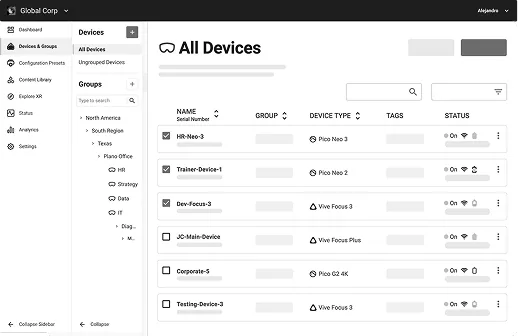
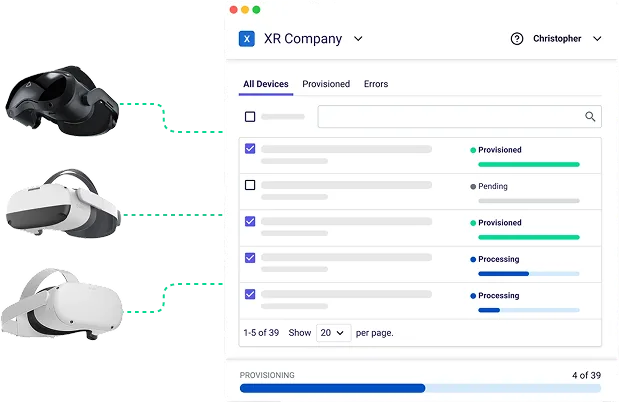
How do we provision and manage those devices at scale?
Who’s going to create or license our XR training content?
How will we ensure this works across IT, L&D, and Operations?
Watch the video below to learn how to use VR for training in your business.
A look at Mars Wrigley:
Mars faced a high-pressure challenge: ramp up training for hundreds of machine operators across multiple facilities. But they didn’t jump straight to devices. Instead, they brought together L&D, IT, and plant leaders to define their training needs, align on content, and select hardware that fit their factory floor constraints. That alignment up front led to a $19M impact in just 7 months.
Case Study:
Mars Wrigley


Challenge
Aligning L&D, IT, and frontline teams to deploy XR across gum manufacturing plants

Action
Defined content needs and selected hardware based on training environment constraints

Outcome
Built a scalable training framework that later expanded across regions and departments
Short on time? Listen to the audio version.
Want help figuring out if XR is right for you?
Explore the content most teams use at this stage:
Keep scrolling to Stage 4
to build your pilot playbook.
Stage 4
Pilot: Define Initial Launch Success
This stage is where early success (or failure) is determined.
Most companies run a pilot. Very few use that pilot to unlock budget, buy-in, and momentum. Why? Because they don’t define success clearly or measure the right things.
The best pilots are small but strategic. They define:
A clear business problem being tested (e.g., reduce onboarding time)
A test group with a traditional training comparison group
Success metrics (time, cost, confidence, retention, performance)
A feedback loop (from trainers and learners)
This is the phase where you lay the groundwork. It’s not about perfecting it but being aligned and getting everyone on board.
Watch the video below to learn how to set up an XR Pilot program for success.
Did you know? With ArborXR Insights, you can track device usage, app completion, and learner progress and sync it with your LMS to report outcomes.
Case Study:
Bosch


Challenge
Wanted to reduce training time across high-skill manufacturing tasks.
Action
Deployed a limited pilot with defined metrics and stakeholder alignment.

Outcome
Proved value, secured budget, and expanded rollout with confidence.
Need help planning your pilot?
Explore content on launching your first XR program the right way
Or move forward in the model to Stage 5
where you’ll learn how to create a repeatable XR infrastructure
Stage 5
Operational: Create Repeatable XR Infrastructure

Set the stage for scalable XR success
So, you’ve launched your first pilots. You’ve seen results. Now, the stakes get higher.
At this point, you’ve validated the impact of XR, and now it’s time to grow.
But with growth comes complexity. Managing five headsets is one thing. Managing 500 across departments, locations, or global teams? That’s where things get real.
This stage helps you build the infrastructure that supports sustainable, scalable XR training. You’re not experimenting anymore. You’re operationalizing.
Questions you’re likely asking now:
Who owns the procurement and provisioning of headsets?
How do we roll out content updates without chasing people down?
Can we tie training outcomes to LMS data and workforce metrics?
Are our trainers and XR champions equipped to succeed?
Watch the video below to learn how to manage VR headsets at scale.
How Pfizer handled this:
As they expanded XR to multiple training sites, Pfizer realized they needed consistent systems to manage it all. They trained internal VR champions, standardized content deployment, and used ArborXR to streamline device management and track training impact. The result? Faster onboarding, fewer support tickets, and more time for strategic innovation.
Case Study:
Pfizer


Challenge
Ensuring consistency and control as XR expanded to multiple training sites.

Action
Created repeatable processes for managing content, training VR champions, and scaling device

Outcome
Proved value, secured budget, and expanded rollout with confidencImproved oversight, accelerated onboarding, and reduced support burden on IT.e.
Want to see what scalable XR operations look like in action?
Explore the resources most teams rely on at this stage:
How ArborXR is Driving Business Transformation
At this stage, XR becomes a core component of your workforce development strategy. It’s embedded in systems, governed by process, and backed by data.
Ready to go enterprise-wide? Head to Stage 6
to learn how teams like Walmart, MDA, and Target embedded XR into their enterprise training strategy.
Stage 6
Standardized: XR is Embedded in Workforce Development

XR at scale requires more than just more devices
You’re here. XR isn’t just a tool anymore. It’s how you train your workforce.
Welcome to the final stage of XR maturity. Here, XR is no longer an experiment or a siloed initiative. It’s embedded across your organization as a core part of onboarding new hires, ensuring compliance, developing skills, and retaining top talent.
This is where XR shifts from innovation to infrastructure.
What full integration looks like in practice
At this stage, XR becomes a core component of your workforce development strategy. It’s embedded in systems, governed by process, and backed by data
XR is a standard part of your onboarding and compliance programs
LMS and HR systems sync with headset activity and learner progress
Content is versioned, refreshed, and deployed like any other digital asset
Trainers have processes and tools and IT has oversight and control
Leadership sees XR as a strategic driver of workforce readiness and retention
Watch the video below to learn why legacy MDMs won’t work with VR training
MDA Space is already here:
To train teams on high-stakes, mission-critical tasks for space operations, MDA embedded XR into their onboarding and simulation workflows. With ArborXR, they gained global oversight, controlled content updates, and delivered consistent training across remote sites. The result? Safer, more prepared teams and a clear operational advantage.
Case Study:
MDA Space


Challenge
MDA needed a secure and scalable way to manage a large fleet of VR headsets across multiple sites.

Action
After partnering with ArborXR, they remotely managed and updated their fleet of headsets, streamlined deployment of sensitive content, and supported immersive training for their team.

Outcome
Gained full control over VR device management, dramatically reduced deployment hangups, and improved training quality.
Short on time? Listen to the audio version.
Explore what enterprise-grade XR looks like in action.
Companies like Walmart, Pfizer, and MDA have built enterprise-wide XR ecosystems.
Now it’s your turn.
Visit the case study library to see how leading orgs solved complex training challenges
Check out The Futurus XR Industrial app for ready-to-launch XR training content built for industrial teams
Want to see what full-scale XR adoption looks like?
Connect with an ArborXR solutions specialist and see how our immersive VR solutions can transform your team's learning and development